

Blue Card Live Check – How it works
Passtab will verify that your visitor’s Blue Card is valid
Sighting a physical Blue Card is not an accurate determination of a person’s working with children status. The person’s Blue Card must be checked against the Queensland Blue Card database every time they visit.
Passtab will ensure a Blue Card is:
- Requested from every visitor that requires one
- Not requested from people who do not
- Verified live on the Queensland Blue Card database, every visit
- Stored on a person’s Quickpin for easy checking on regular visits
- Available in auditable reports
Click here to request activation of the Blue Card Live Check module on your account
What details are required to validate a Blue Card
Passtab collects the information required by the Queensland Blue Card database to complete the check:
- Card Type: Blue or exemption card
- Full name exactly as printed on card
- Card number (numbers before the slash)
- Card issue number (number after the slash)
- Card expiry date
Casual visitors (without a Quickpin)
Passtab will collect the details listed above. These details are sent, immediately, by Passtab to the Queensland Blue Card database. If they are valid, entry is granted, if they are not valid entry is denied.
Regular visitors (with a Quickpin)
Create a Quickpin to make sign in faster and more convenient. The Quickpin stores the Blue Card details, and verifies the card on every visit.
A visitor with a Quickpin will also be visible in your Passtab dashboard as a stored card. This will allow you to run a check on a single or multiple cards any time you wish.
For instructions on creating a Quickpin, visit this article
Verifying stored cards
Blue Card details that are stored on Quickpins will appear in the Passtab dashboard. There are two functions here:
- Single card check
- Bulk card check
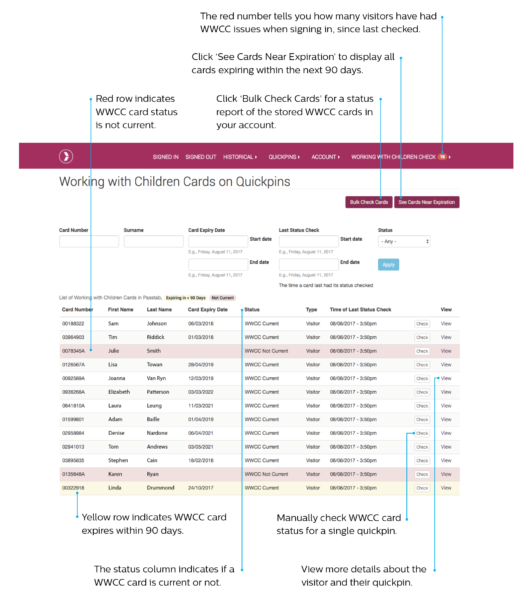
- At any time, you can check a stored Blue Card
- Click “Blue Card” in the main menu
- Locate the cardholder using the search filters
- Click “Check” to initiate the verification process with the Queensland Blue Card database
- Or, click “Bulk Check” at the top of the page to verify all stored cards
- The results will appear on screen
Who will Passtab collect Blue Card details from
Our configurations team will work with you to design the right workflow for your Blue Card collection criteria. It will likely depend on the reason for their visit, who they will be in contact with and under what conditions. Passtab will provide a series of options to ensure people who do not require a Blue Card for their visit can by-pass this requirement and those that do, are required to provide a valid Blue Card.
Passtab Blue Card module alerts
Card details provided are not correct
This may mean the card number does not match the name of the card holder, or information is missing (middle name for example). The information on the Blue Card must be entered exactly as it appears on the card, into Passtab.
1. The visitor will get the chance to rectify any mistakes in their card number or name.
2. Your Passtab admin area will show a failed attempt See: Blue Card > Alerts. Click here to find out why.
3. When the visitor fixes the mistake, Passtab checks again and if correct the visitor may sign in.
4. If the visitor is unable to enter a a complete set of correct Blue Card, they will not be able to sign in.
5. Where a person cannot successfully sign in, an email alert will be sent to the schools nominated email address. (This can be multiple emails. It is generally set to your main school email address, to change this please contact us).
WWCC not current
This means the check is not valid (ie: not approved or an approved check revoked) or the card has expired.
1. The visitor will not be able to sign in to the school.
2. An email alert will be sent to the nominated email address. (This can be multiple emails. It is generally set to your main school email address, to change this please contact us).
3. Passtab recommend that you follow up on this information with the cardholder.